

Migrate to SharePoint Online and Microsoft 365 Quickly and Easily with ShareGate
Why ShareGate?
Upgrading from legacy SharePoint versions to SharePoint Online aligns your technology with today’s modern business environment. We offer a fast, dependable content migration solution, ensuring a secure and seamless transition to Microsoft 365. Our comprehensive approach simplifies the migration process, minimising downtime and maximising efficiency for your organisation.

Adepteq is a ShareGate Elite Partner, find out what this means for you.
Adepteq and the ShareGate Toolkit
Adepteq is a ShareGate Elite Partner and uses ShareGate Migrate for more complex migrations to ensure sites, workflows, forms, and metadata are migrated. ShareGate is not priced based on the volume of data being migrated so is very cost-effective for organisations with large volumes of data to migrate. We also use ShareGate for migrations from Google Drive to SharePoint and Box to SharePoint. ShareGate Protect empowers your organisation to thrive in the AI world with a governance solution that optimises workspace lifecycle management and keeps oversharing in check without breaking a sweat.
Turn migration to SharePoint into a growth opportunity foryour organisation
Accelerated Migrations
Keep your timelines on track with accelerated on-prem to cloud or tenant-to-tenant migrations with out-of-the-box usability and high-performance data transfer deployments.
Easy Deployment
Move faster with a true out-of-the-box solution that is easy to deploy and use. No scripts required!
Single Tool Usage
Streamline effort using a single tool for all migration workloads: SharePoint, Teams, Exchange, Planner and more.
Meet Deadlines
Meet deadlines by accelerating data transfer deploying multiple machines to run concurrent migration tasks.
Fit For All Teams
Multiple activations optimise effort distributing workloads across the team: project managers do planning & strategy, infrastructure drive mailbox migration, operations migrate, and security teams govern.
Integration
ShareGate integrates Microsoft directives with automated policies and the Azure ShareGate app to effectively mitigate throttling and ensure optimal data transfer speed.


Modernise with Confidence
Preserve the integrity of your data with every move while you transform with configurations that meet the needs of your unique environment.
Granular Control
Granular control and configurations ensure your unique company IT requirements are met.
Configurable Mapping
Automated and configurable mapping ensures your people migrate seamlessly according to your strategy.
Align Strategies
Lift and shift in one shot or simple filters specify objects, structure, mapping to align with any migration strategy.
Maintain Visibility
Maintain critical visibility and control with centralised, deep dive permissions discovery and granular or bulk adjustments.
Reporting
Custom reports pinpoint the exact parameters to migrate or administer your environment to your specifications.
Leave No Best Practice Behind
Ensure the end-to-end success of your migration project from planning assessment tools to access management and turnkey Microsoft 365 end-user training.
Best Practices
Migrate with best practices built in across every stage of your migration journey: from discovery through adoption.
Report Generation
Reports include quick actions to simplify administration with bulk edits to metadata, permissions, settings and more.
Pre-built reports that go beyond core migration needs: Checked out documents, external sharing, orphaned sites and users, and the Permissions Matrix Report.
Management
Protect your new environment and its data with controlled management for external sharing and inactive workspaces.
Training
Turnkey Microsoft 365 end-user interactive training accelerates adoption across your entire organisation.
Governance
Deploy future-proofed governance with workspace provisioning templates.
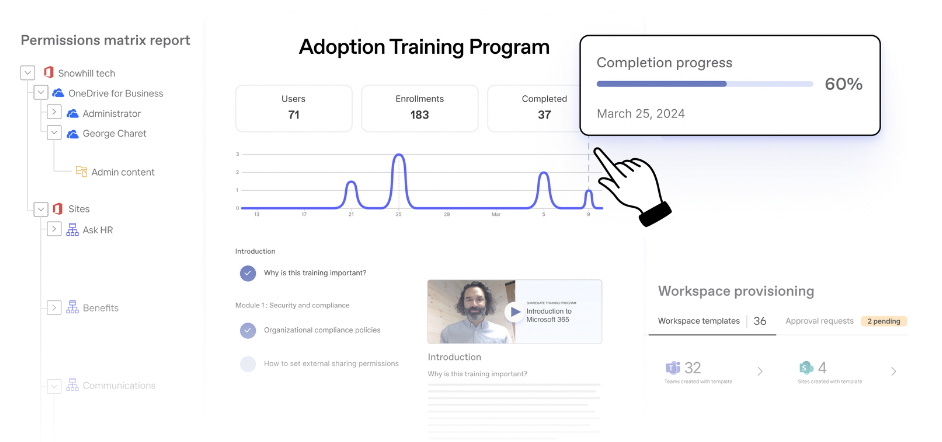
If you’re interested in learning more about ShareGate, you can access our ShareGate flyers for download, allowing you to share it with your colleagues and provide them with valuable information.
Your Migration Packages
ShareGate Migrate Essentials
- Move what you want, where you want it
- Stay in the know, stay on track with our custom reports
- Ensure the right people have access to the right things
- Single activation
- Subscriptions available for 1, 2 or 3 years
ShareGate Migrate Pro
- Clean up, organise and govern your tenant in a flash
- Tenant to tenant Email migrations
- Supports Google to Microsoft Migrations
- ShareGate user training portal
- 5 Activations for more users or to accelerate your projects
- Subscriptions available for 1, 2 or 3 years
Migration Starter Package
- ShareGate Migrate Essentials
- 5 days expert consultancy
- Discovery and analysis of your environment
- Assist with planning your new environment
Migration-as-a-Service
- Full end-to-end migration consultancy
- Discovery, analysis & design
- Full configuration & pilot migration
- Optimised live migration
- Post migration support and onboarding
Trusted Partner for Migrations to SharePoint and Microsoft 365
Adepteq has successfully completed numerous migrations to SharePoint Online using ShareGate, ensuring our clients experience seamless transitions led by Microsoft Certified Professionals who expertly handle the complexities of data migration. Our tailored approach guarantees secure, efficient, and reliable outcomes for every migration project.
Our SharePoint Migration Clients Include





Frequently Asked Questions About ShareGate
A Microsoft Solutions Provider for Modern Work is a certified partner, like Adepteq, recognised by Microsoft for helping UK businesess adopt and optimise Microsoft 365. Only 2% of Microsoft partners in the UK hold this certification, making it a mark of trusted expertise in delivering secure, collaborative, and productive modern workplace solutions. It means we deliver expert services in deployment, migration, support, and optimisation to improve productivity, collaboration, and security.
ShareGate Migrate supports SharePoint (on-premises and Online), file shares, Google Workspace, Google Drive, Box, OneDrive, Teams, and tenant-to-tenant migrations across Microsoft 365 services. As an Elite UK partner, Adepteq ensures that migrations are tailored to your organisation’s specific architecture, whether you’re consolidating tenants, moving from legacy systems, or running hybrid deployments.
Yes—ShareGate can migrate content from OneDrive for Business and My Sites, provided you have site collection admin rights. Larger migrations can be automated with PowerShell. Adepteq works closely with UK businesses to plan and execute OneDrive migrations safely, including permissions validation and compliance checks.
Yes—ShareGate preserves document metadata, version history, and workflows to maintain compliance and data integrity. For regulated UK industries, Adepteq ensures full audit trails and historical records are retained, supporting governance and legal requirements during migration.
Yes—ShareGate offers incremental (delta) migrations, scheduling, and automatic error handling. Adepteq helps UK organisations design migration plans that minimise disruption, automating jobs to run overnight or during downtime, ensuring business continuity.
ShareGate licenses are based on activations, available in single-user or multi-user subscriptions, with flexible transfer between machines. Trials are also available. Adepteq advises UK clients on the most cost-effective licensing approach and can manage activations to streamline deployment.
No—ShareGate Migrate is only available in English. For UK organisations with multilingual teams, Adepteq can provide user-friendly documentation, training, and ongoing support to bridge the language gap.
Yes—ShareGate supports list migrations with attachments, retaining both structure and content. Adepteq ensures attachment-heavy lists are migrated correctly and aligned with UK data retention policies.
ShareGate Migrate installs on any Windows machine and does not require installation on the SharePoint server. It requires .NET 4.6.2 or later, at least 4GB RAM, and PowerShell for scripting. Adepteq provides hands-on installation and environment configuration, ensuring smooth deployment for UK businesses in both on-premises and cloud setups.
Occasionally, migration tasks may hang or fail, particularly on large jobs. Common solutions include switching to normal mode, clearing the local cache, or restarting tasks. Adepteq proactively monitors migration jobs for UK clients, applies best practices to prevent failures, and resolves issues quickly to keep projects on track.
Ask the Expert: Microsoft Q&A
Are you interested in getting the most out of Microsoft? Our mission is to offer actionable & outcome-focused guidance, empowering our customers to unleash the complete capabilities of the Microsoft Suite. Schedule a 15-minute call with us now & choose a time & date that works for you.